POS and back office for cafés and food stalls

Handling numbers is easy with CostEase.

Ring up orders at the counter. Every cup or plate you sell takes its ingredients out of stock and records what it cost you. At closing, you see real profit, not just sales.

Already using CostEase? Get the POS app for Android →

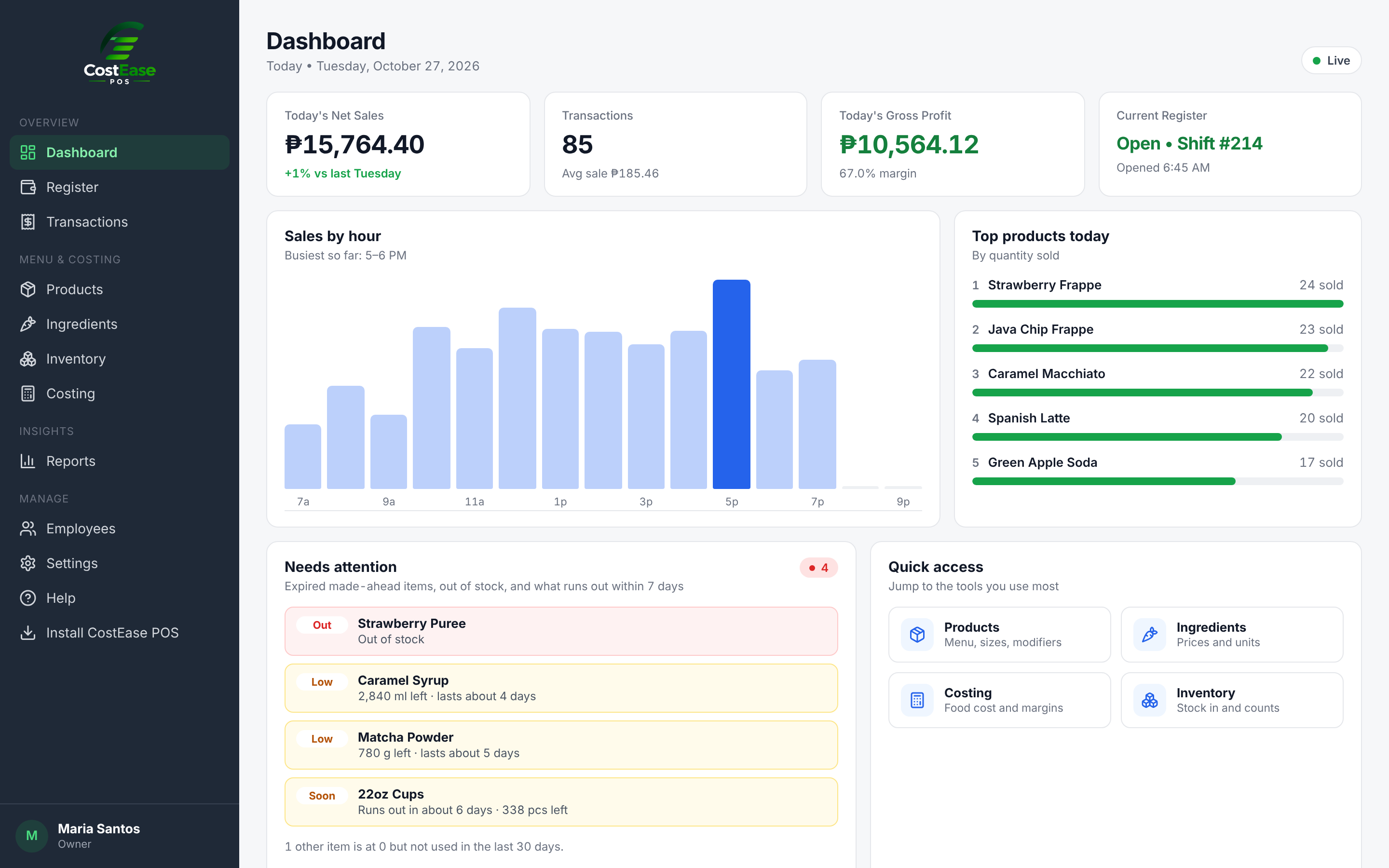
CostEase Back Office dashboard
One sale, counted
Java Chip Frappe 16oz
Sold₱115.00
Cost₱34.80
Profit₱80.20
Sample numbers

What happens when the cashier taps an item

Set up the recipe once. After that, CostEase does the counting on every order, including bundles and add-ons.

  1. 1

    The order is rung up

    Size, add-ons, bundle choices and notes go in. The receipt and kitchen ticket print over Bluetooth.

  2. 2

    Stock goes down

    150 ml milk, 2 pumps syrup, one 16oz cup and lid leave inventory, following the recipe.

  3. 3

    The cost is saved

    The ingredient cost at that moment is stored with the sale, so old reports don't change when prices do.

  4. 4

    Profit shows up in reports

    Sales, cost and profit by category, to the centavo. Bundle items are counted in their own categories.

At the counter

Checkout
Sizes, add-ons with pick rules, bundles, discounts, cash and e-wallet, split payment.
Works offline
Keeps selling when the internet drops and syncs later.
Receipts
Your logo and details on 58mm or 80mm paper, plus a kitchen ticket.
Register
Open and close shifts, count cash, and record cash in and out.
Queue and pickup
Orders flow to a kitchen queue and a TV screen for customers.
Loyalty
Find a customer by phone, give stamps, and use rewards in one tap.
QR orders
Type the customer's 4-digit code and their order lands in the cart.

In the back office

Products
Items, sizes, categories, add-ons, bundles and discounts. Set rules like “pick 2 flavors”.
Recipes and costing
Cost per cup or plate, food cost percent, and margin by item.
Inventory
Stock in, counts, made-ahead mixes, brewed and cooked items, low stock and days left.
Reports
Sales, COGS and gross profit by day, category, item and bundle. See what sold inside each category.
Customers
Stamp cards, visits, total spent and rewards waiting. Export to CSV.
Team
Cashier PINs, roles, and the access rights you choose.

Bring customers back. Serve them faster.

Two newer tools that work with the same menu, stock and reports.

Loyalty stamps · Free and Pro

A stamp card that can't get lost.

Customers are saved by phone number. You set the rules: one stamp per visit or per amount spent, and rewards like a free drink or a free upsize. The card prints on the receipt, and unclaimed rewards wait for the next visit.

QR ordering · Pro add-on

Customers order from their phone.

Put the QR poster on the counter or tables. Customers pick items, sizes and add-ons, then get a 4-digit code. Sold-out items are blocked. No app to install, and they still pay at the counter.

The actual screens

No mockups. Click any screenshot to see it full size.

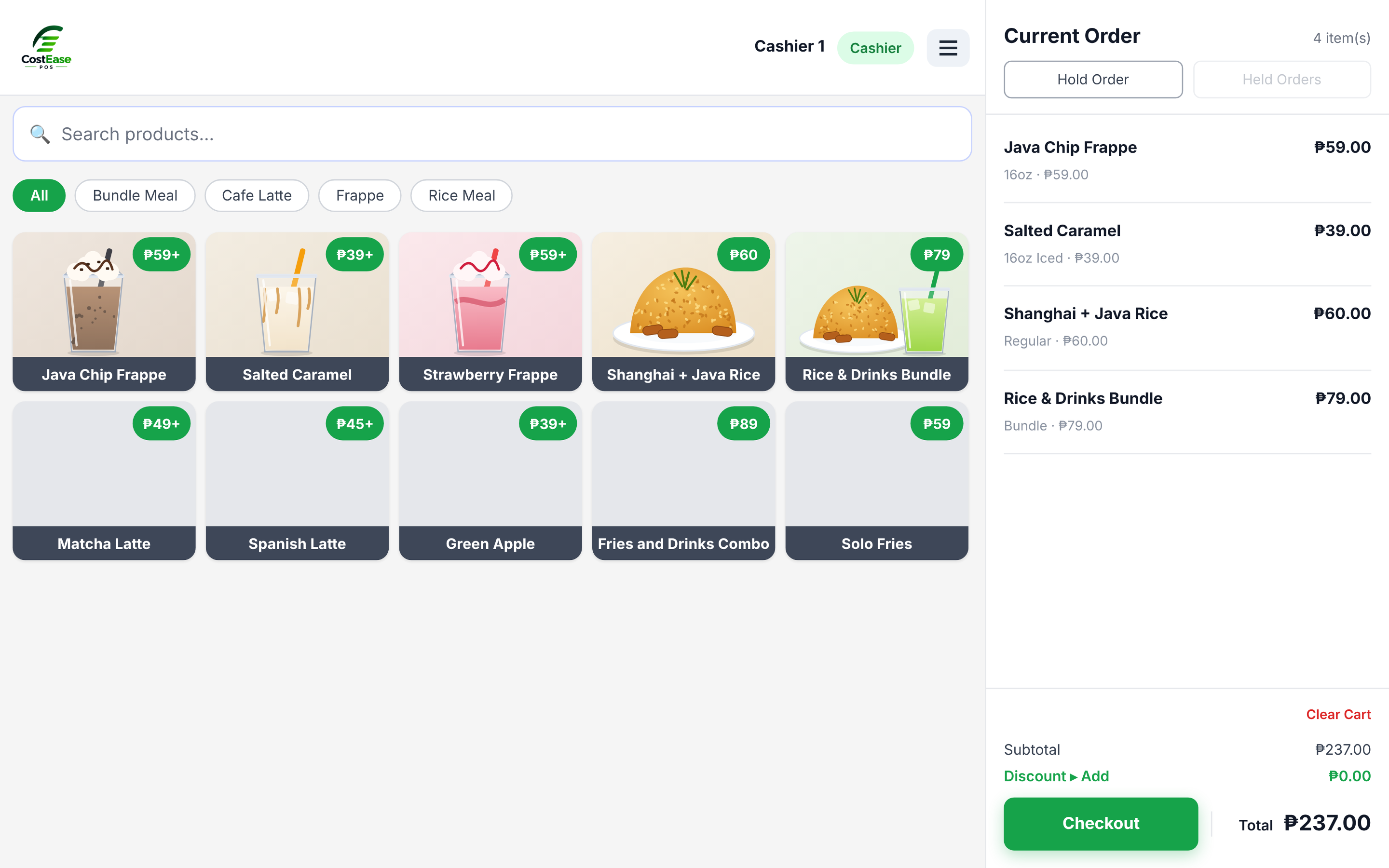
CostEase POS checkout screen
POS app

Built for a busy line, on a phone or a tablet.

Big buttons, product photos and category chips. Hold an order for later, add a note for the barista, and take the next customer.

CostEase kitchen order queueCostEase customer pickup screen
Queue and pickup

The kitchen sees it. The customer sees when it's ready.

Orders turn yellow after 5 minutes and red after 10. Mark one ready and its number shows on the pickup screen with a chime.

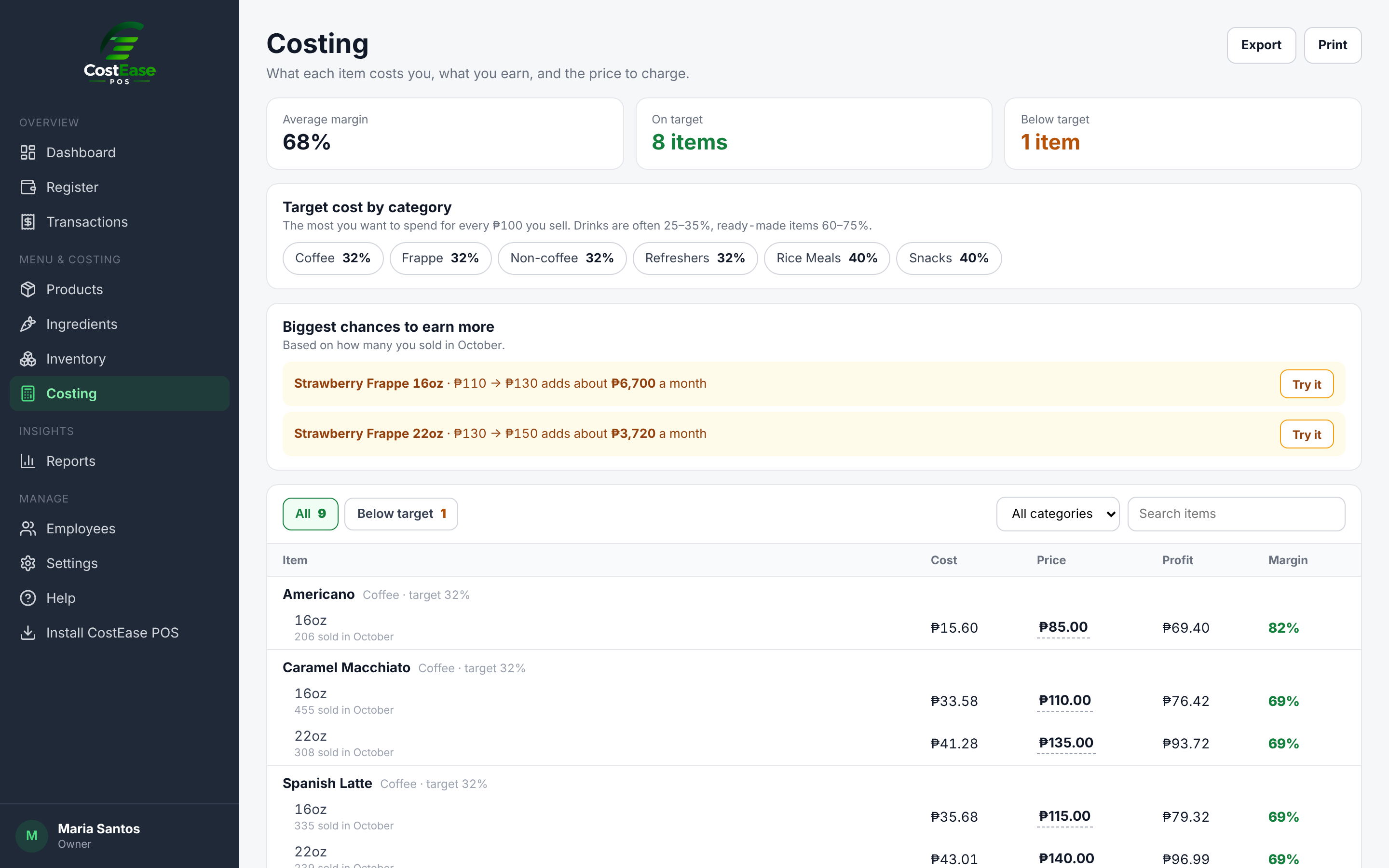
CostEase product costing screen
Costing

Know which items are eating your margin.

Each item shows its recipe cost, selling price, profit and food cost. Anything above your target is flagged, so you know what to reprice first.

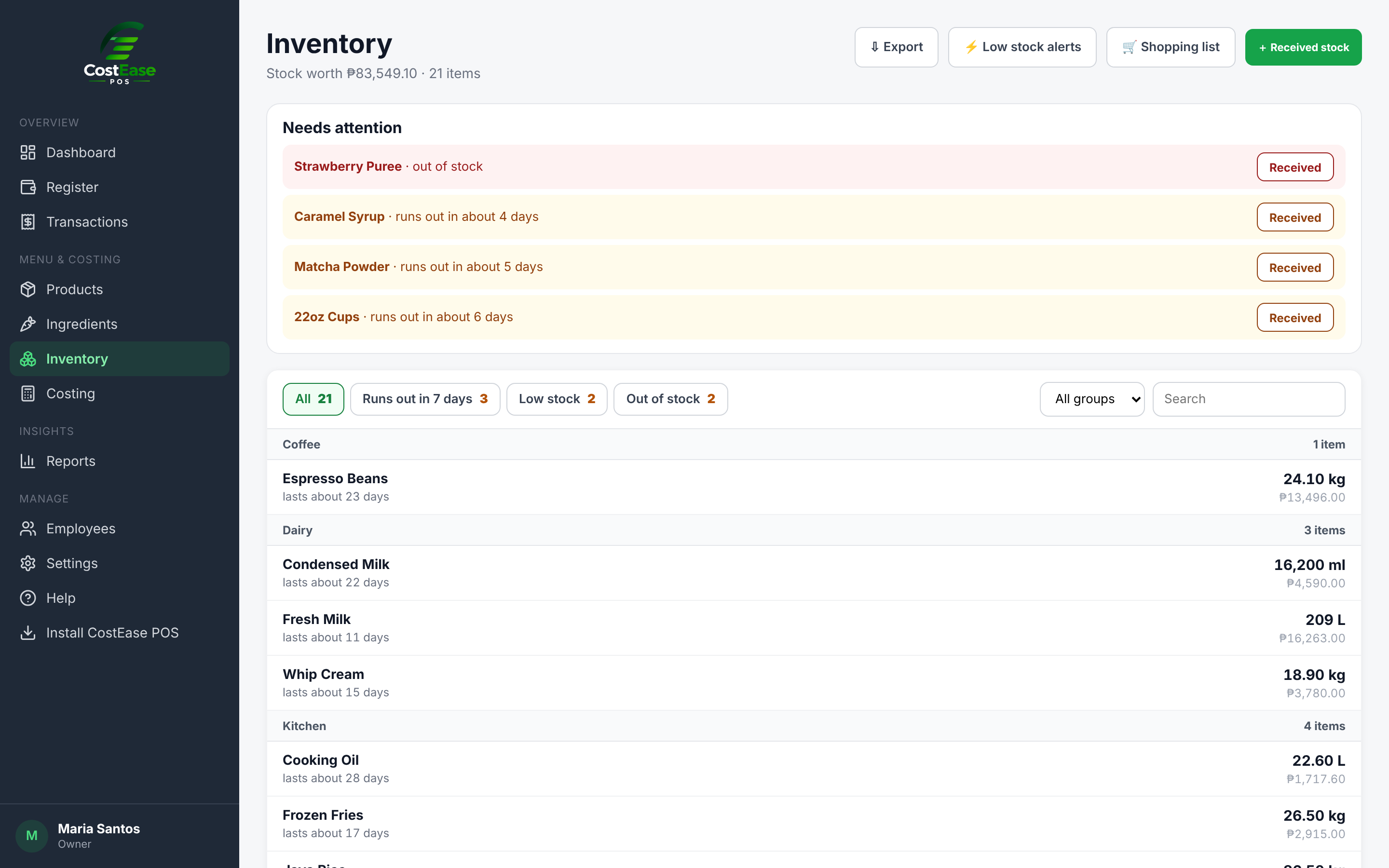
CostEase inventory screen
Inventory

See what's running low before the rush.

Stock updates with every sale. Record deliveries, do a count, and prepare mixes ahead of time. CostEase tells you how many days each item will last.

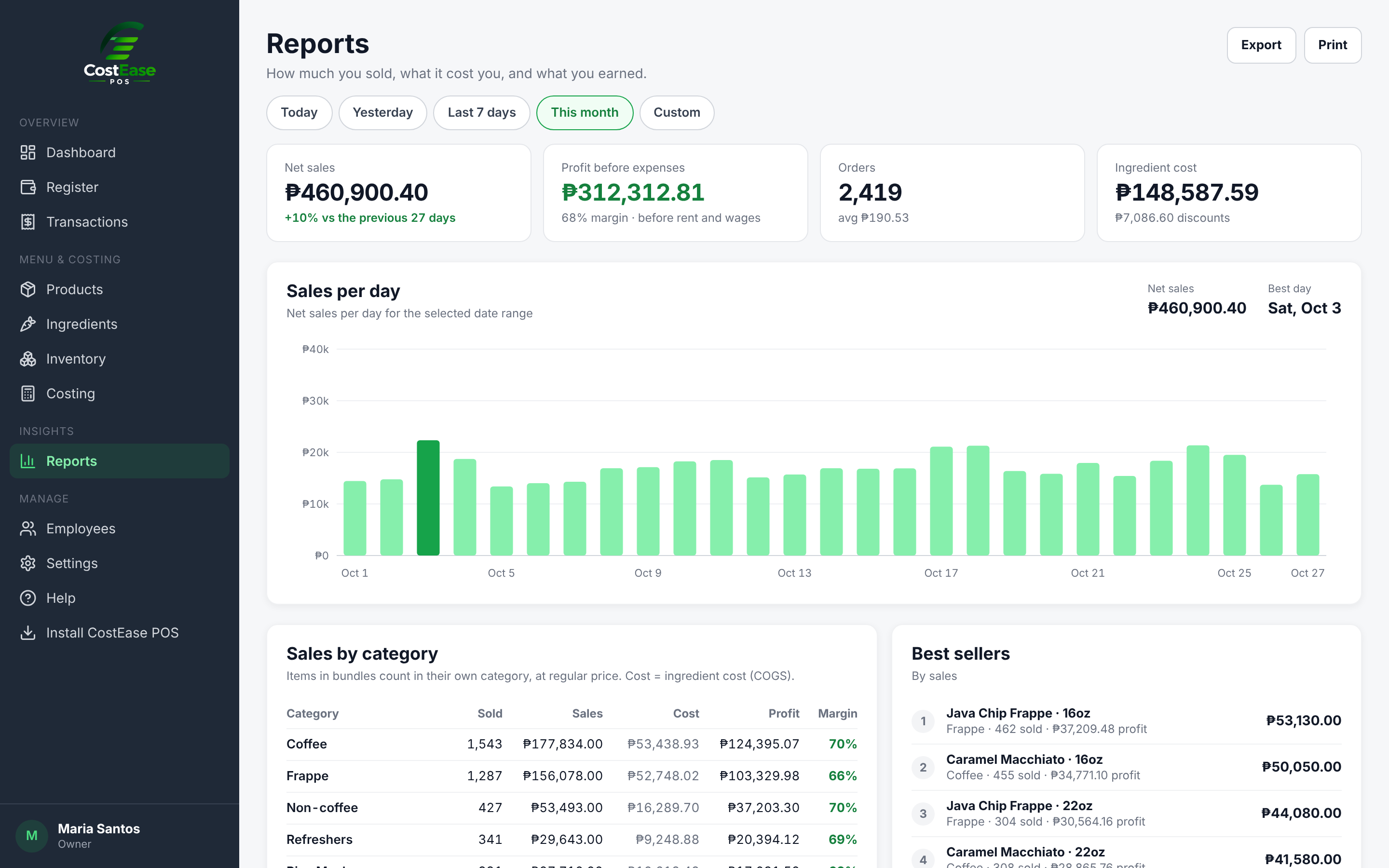
CostEase sales reports
Reports

Sales minus cost, for any day or month.

Gross sales, discounts, refunds, COGS and gross profit, by category and by bundle. Export to CSV when your accountant asks.

Your numbers stay yours

Money records can only be changed through CostEase itself, with the right permission.

  • Separate dataEach business only sees its own sales, products and staff.
  • PIN for every cashierEvery sale is tied to the person who made it.
  • Access rightsChoose what managers and cashiers can open or change.
  • Voids need approvalVoids and refunds need a manager PIN, and every one is logged.
  • Device controlSign out a lost or old phone from Settings. Unused devices sign out on their own.

Start free. Upgrade when you need more.

Run the counter on Free. Add costing and inventory when you're ready, and QR ordering when you want it.

Free

₱0

For getting the counter running.

  • Point of sale
  • Product management
  • Sales reports
  • Payment settings
  • Loyalty stamps
Start free

Pro For knowing your costs

₱3,990 / year

About ₱333 a month · save ₱798

For owners who want to see profit, not just sales.

  • Everything in Free
  • Ingredient management
  • Recipe management
  • Inventory management
  • Product costing
  • Timecards New
  • Other Pro features
Try Pro free for 14 days

QR ordering Add-on for Pro

+₱1,000 / year per branch

Or ₱100 every 30 days

For stores that want customers to order from their phone.

  • Printable QR poster
  • Order with sizes and add-ons
  • Sold-out items blocked
  • 4-digit code to the POS
  • 7-day free trial
Try it free
More branches?Each extra branch is ₱2,990 a year. One bill and one due date for all your branches.
Add a branch

Pay by GCash. Your price stays the same until your plan ends. Some features need a Pro subscription.

Questions owners ask

What do I need to run it?

An Android phone or tablet for the POS, and any browser for the Back Office. Many owners run the Back Office on a laptop and the POS on a tablet at the counter.

What happens when the internet goes down?

The POS keeps selling. Sales are saved on the device and sync on their own when the connection comes back. You can also sync by hand from the POS menu.

Which printers work?

Bluetooth thermal receipt printers, 58mm or 80mm. Your logo, store details and footer print on every receipt, and you can print a kitchen ticket that shows only the order.

How does the pickup screen work?

Open the pickup page on a TV or tablet browser, then type the code it shows in Settings. Ready orders appear with your logo and a chime.

Is my data separate from other stores?

Yes. Each business only ever sees its own sales, products and staff. Cashiers log in with their own PIN, and you decide what each role can open.

How do loyalty stamps work?

At checkout the cashier finds the customer by phone number or adds them in a few seconds. Stamps are saved online, so there are no paper cards to lose. You set the rules: per visit or per amount spent, and rewards like a free drink or a free upsize.

How does QR ordering work?

Print the QR poster from Settings. Customers scan it, pick items on their phone and get a 4-digit code. The cashier types the code on the POS, the order goes into the cart, and the customer pays at the counter. Sold-out items can't be ordered.

Can I pay yearly?

Yes. Pro is ₱3,990 a year, which is 2 months free. QR ordering is ₱1,000 a year if you add it. If you still have days left on a monthly plan, the year starts after they end.

How much for more branches?

Your first branch is ₱399 every 30 days or ₱3,990 a year. Each extra branch is ₱299 or ₱2,990. All branches share one bill and one due date. When you add a branch, the first payment only covers the days up to that date. The 14-day free trial is for your first store only.

Can I get a refund?

Payments aren't refundable, so try Pro free for 14 days first. No payment is needed for the trial, and your price stays the same until your plan ends.

Can I start without paying?

Yes. The Free plan has the POS, products, sales reports, payment settings and loyalty stamps. Move to Pro when you want ingredients, recipes, inventory and costing.

Know your numbers from the first sale.

Add your menu, set up a recipe or two, and ring up your first order today.

Start free